Operations for AI on AWS: How to run AI agents in production
· 18 min read
Most operations teams have AI pilots running somewhere. Getting the initial pilot up and running usually takes a few days, but getting approval for production use, plus maintaining and operating agents, is a different story.
To move into production, you need guardrails, observability, access controls, runtime protection, and identity, among other things, especially when you need to scale agentic systems across a large organization.
The debate on whether these systems can be useful is over; the main question now is how to adopt them safely at scale. Accountability still stays with humans. An agent that changes your infrastructure is still your agent.
This post follows a reference stack for AI operations on AWS. It builds on the agent control plane I described in August, and focuses on running agents day to day.
Two halves of agentic operations
AI for operations: agents that do operations work. They triage tickets, categorize incidents, correlate logs, and pick runbooks. AWS DevOps Agent is a good example; it correlates telemetry with code and deployment data, then posts its findings to the incident channel.
Operations for AI: the foundations that make all kinds of agents safe to run. Edge protection, identity, content guardrails, tool access, observability, and cost attribution all sit here. The rest of this post covers this half.
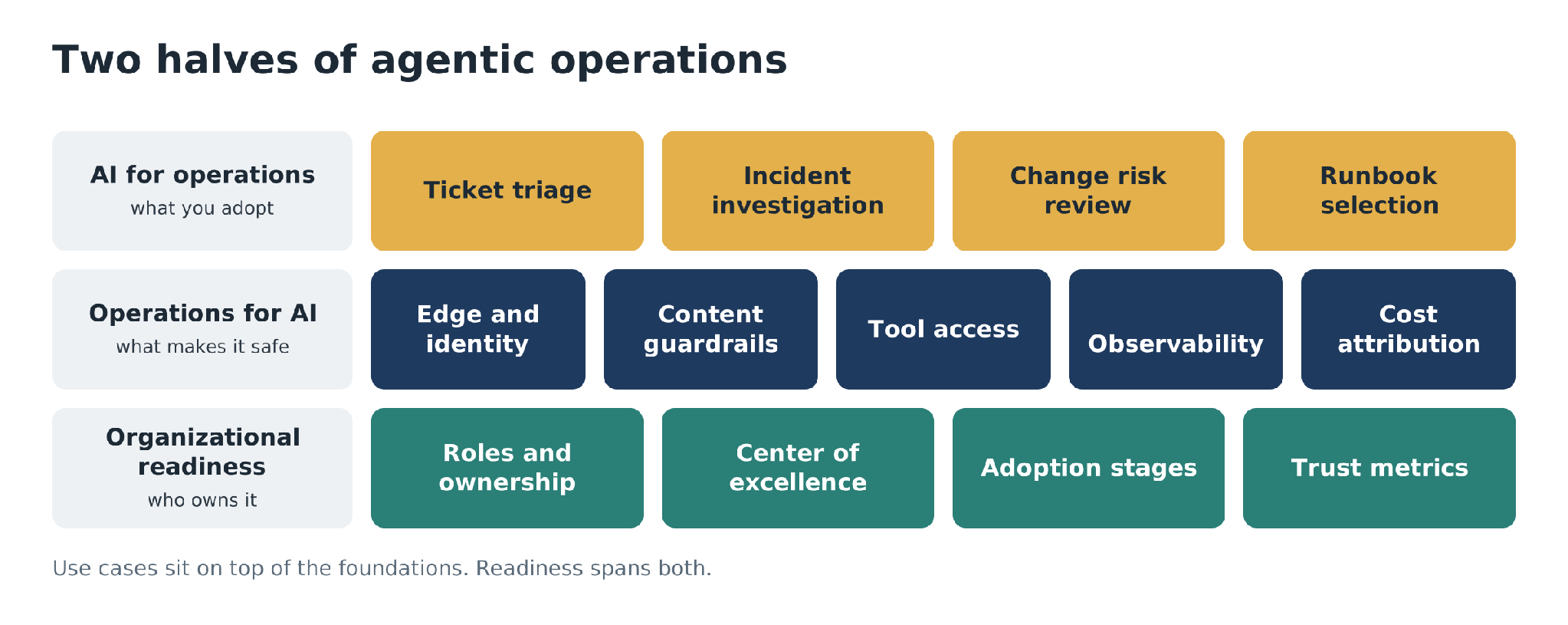
Figure 1: The two halves of agentic operations, with organizational readiness across both.
You should be thinking about several domains around the operations for AI:
| Domain | What it covers | Main AWS services |
|---|---|---|
| Governance and compliance | Data classification, operating boundaries, audit trails | Bedrock Guardrails, AgentCore Policy, CloudTrail, AI Inventory in Security Hub |
| Operational reliability | Quotas, drift, evaluation, safe model upgrades | CloudWatch, Omni, AgentCore Observability, AgentCore Evaluations |
| Data access and integration | MCP, scoped tool access, workload identity | AgentCore Gateway, AgentCore Identity |
| Cost management | Token-level visibility, attribution, budgets | Cost Explorer, application inference profiles, AWS Budgets |
| Security and forensics | Prompt injection defense, PII in logs, blast radius | AWS WAF, CloudWatch Logs data protection, GuardDuty AI Protection |
| Organizational readiness | Roles, skills, center of excellence, adoption stages | People and process |
Follow one request through the stack
Imagine we have an agentic application powered by a chatbot UI. Let’s track every request through the end-to-end path:
Edge: AWS WAF screens the request before anything else sees it.
Identity and authorization: the gateway checks who is calling and what that caller may do.
Content governance: an Amazon Bedrock Guardrail evaluates the prompt (and, later, the response).
Routing and tool access: a model gateway sends the call to an approved model (a common implementation we see is LiteLLM Gateway); Amazon Bedrock AgentCore Gateway sends tool calls to MCP tools under Cedar policies.
Model invocation and observability: Amazon Bedrock or AgentCore Runtime runs the request, while Amazon CloudWatch records metrics and traces. Amazon CloudWatch Omni can pull those traces into one view with the rest of your application telemetry.
Cost: token counts turn into spend, which you tag and attribute in AWS Cost Explorer.
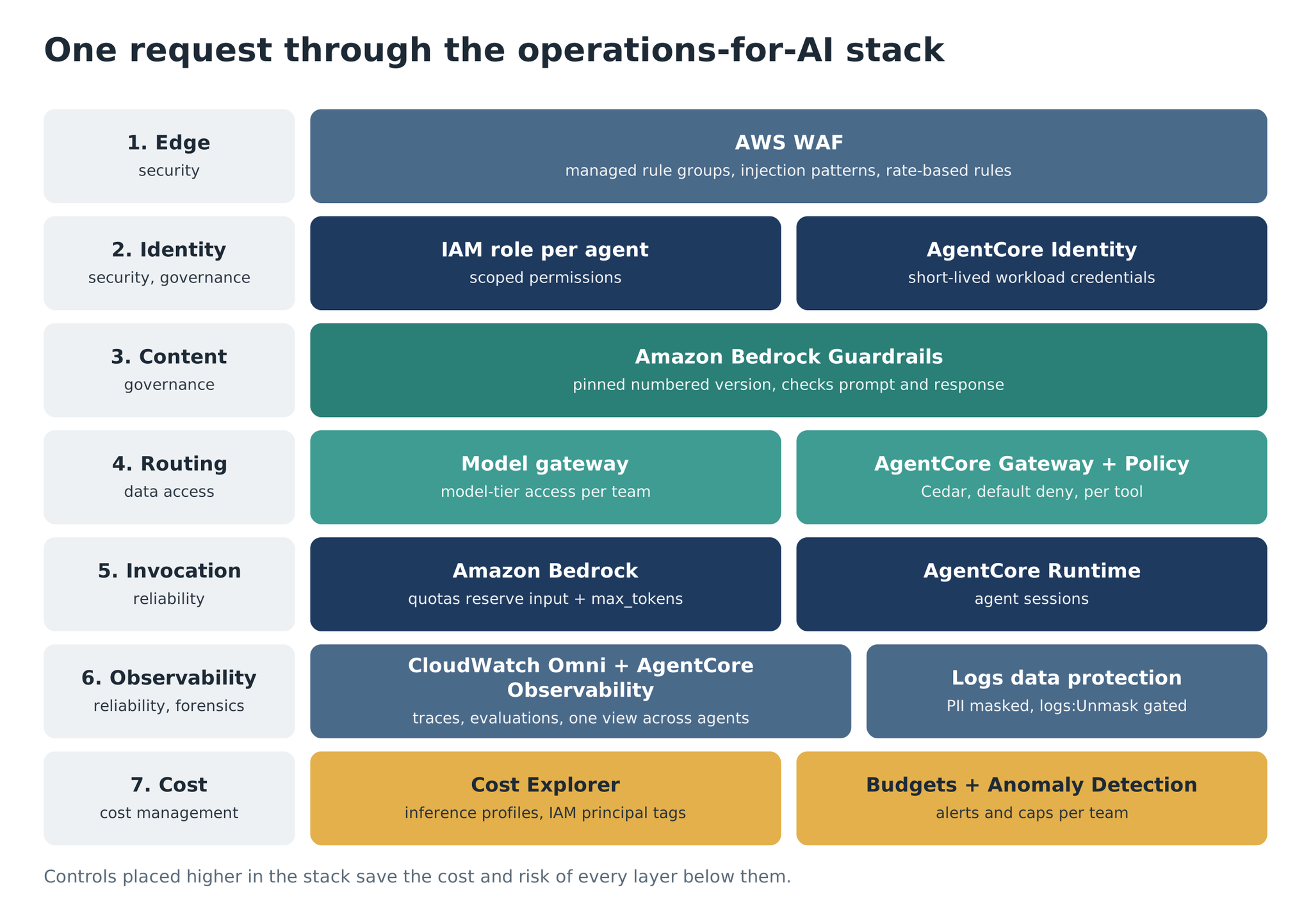
Figure 2: One request through the operations-for-AI stack, with the AWS control at each hop.
Edge protection and identity
The first hop is AWS WAF. A web ACL could sit in front of the gateway. AWS managed rule groups cover common web threats and bad bots. Custom rules match known prompt-injection phrasings in the request body, and rate-based rules stop floods from a single source. WAF is cheap, and it cuts the volume that reaches the expensive layers.
Identity comes next, in two separate steps. Authentication proves who is calling. Authorization decides what that caller may do.
For agents, identity is the base layer for everything else. Each agent needs a verifiable identity of its own, permissions scoped to its job and an execution history you can trace. On AWS, that maps to an IAM role per agent and to AgentCore Identity, which issues short-lived workload credentials when an agent calls a downstream API or tool. The agent never stores a long-lived secret. If it is compromised, the credential it holds expires soon after.
Think in zero-trust terms here; you should be able to audit any action an agent takes, and you should be able to reverse it.
Figure 3 shows how these pieces fit together for the chatbot example. AWS WAF screens traffic at the edge. Behind it, Amazon Cognito signs users in, and AgentCore Identity hands the agent short-lived credentials for each tool it calls.
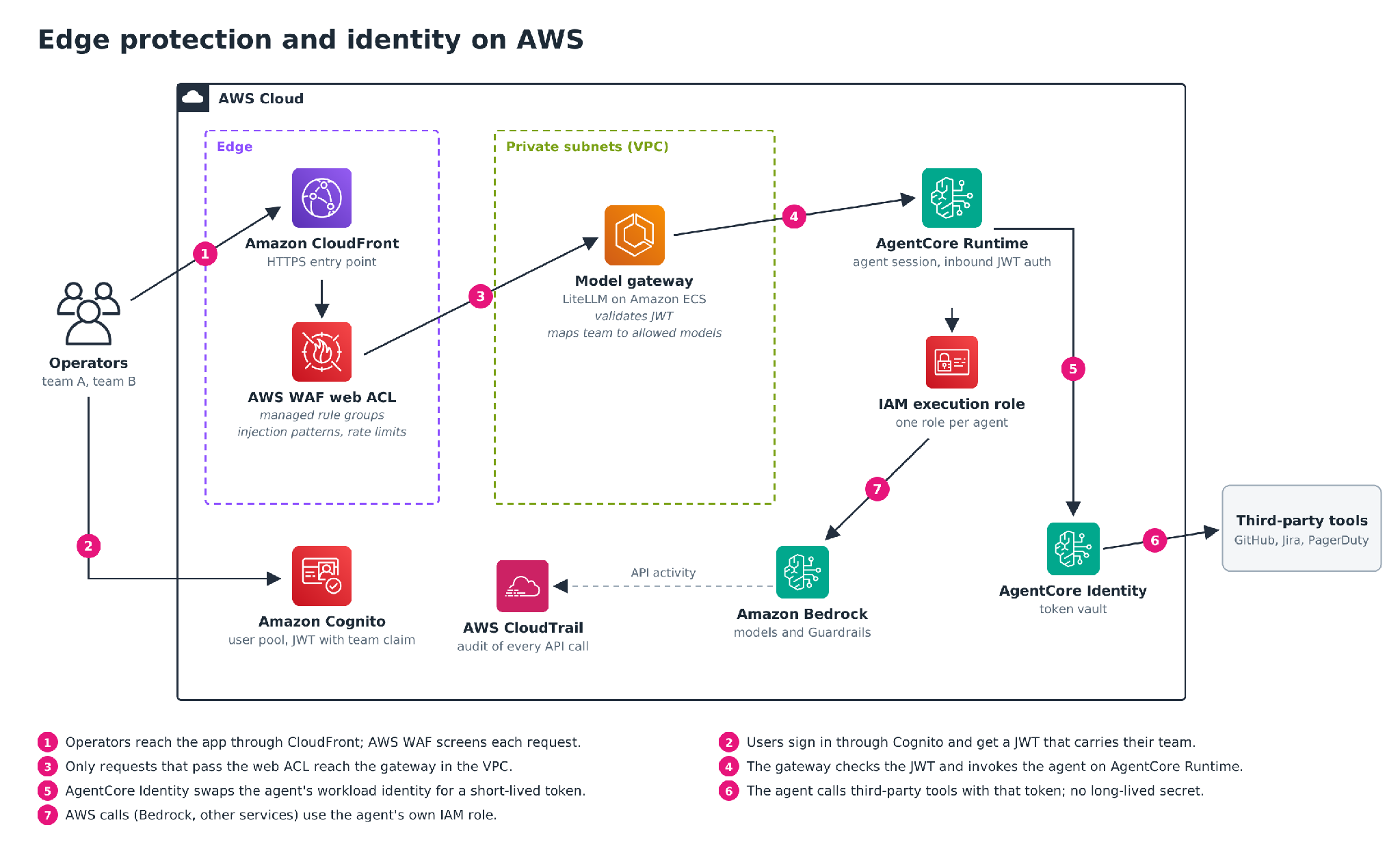
Figure 3: Edge protection and identity on AWS for the chatbot example.
Content governance with Amazon Bedrock Guardrails
Once a request is authenticated and authorized, the guardrail checks what it says.
Start one step earlier, with the data. Classify operational data by sensitivity before it flows through inference: which log fields contain customer data, and which tickets carry personal information.
A Bedrock Guardrail contains different policy types.
Content filters: harmful categories such as hate, insults, sexual content and violence, plus a prompt attack category that detects jailbreaks and prompt injection.
Denied topics: subjects the application must not discuss, described in plain language.
Word filters: exact-match words and phrases, including a managed profanity list.
Sensitive information filters: detect or mask PII and custom regex entities.
Contextual grounding checks: flag responses that are not grounded in the source material, or not relevant to the query.
Automated Reasoning checks: validate responses against logical rules you define.
Guardrails run in both directions: on the prompt before inference and on the response after it. If your model runs outside Bedrock, the ApplyGuardrail API runs the same checks on any text you pass it.
Versioning is what turns a guardrail into an operational control. You edit the working draft. When it passes testing, you create a numbered version; numbered versions are immutable. Production pins to that version. Pinning also gives you separation of duties. The team that writes guardrail policy promotes a version; the team that deploys agents consumes it. Promotion becomes the approval step.
Tool access: MCP, AgentCore Gateway and Cedar
After the content check, the gateway routes the request. Model-tier access decides which models a team may call. Tool-tier access decides which tools an agent may invoke; it runs through AgentCore Gateway, which turns Lambda functions and existing APIs (including other MCP servers) into tools behind one MCP endpoint.
Tool authorization uses AgentCore Policy. You attach a policy engine to the gateway and write policies in Cedar, the open-source policy language AWS also uses in Amazon Verified Permissions. The gateway evaluates every tool call against those policies before the tool runs. Cedar denies by default: a call goes through only if a permit policy matches, and any matching forbid wins. All of this happens at the gateway, outside the agent’s code.
Figure 4 follows one tool call through the gateway. The policy engine sits between authentication and the target, so a denied call never reaches the tool.
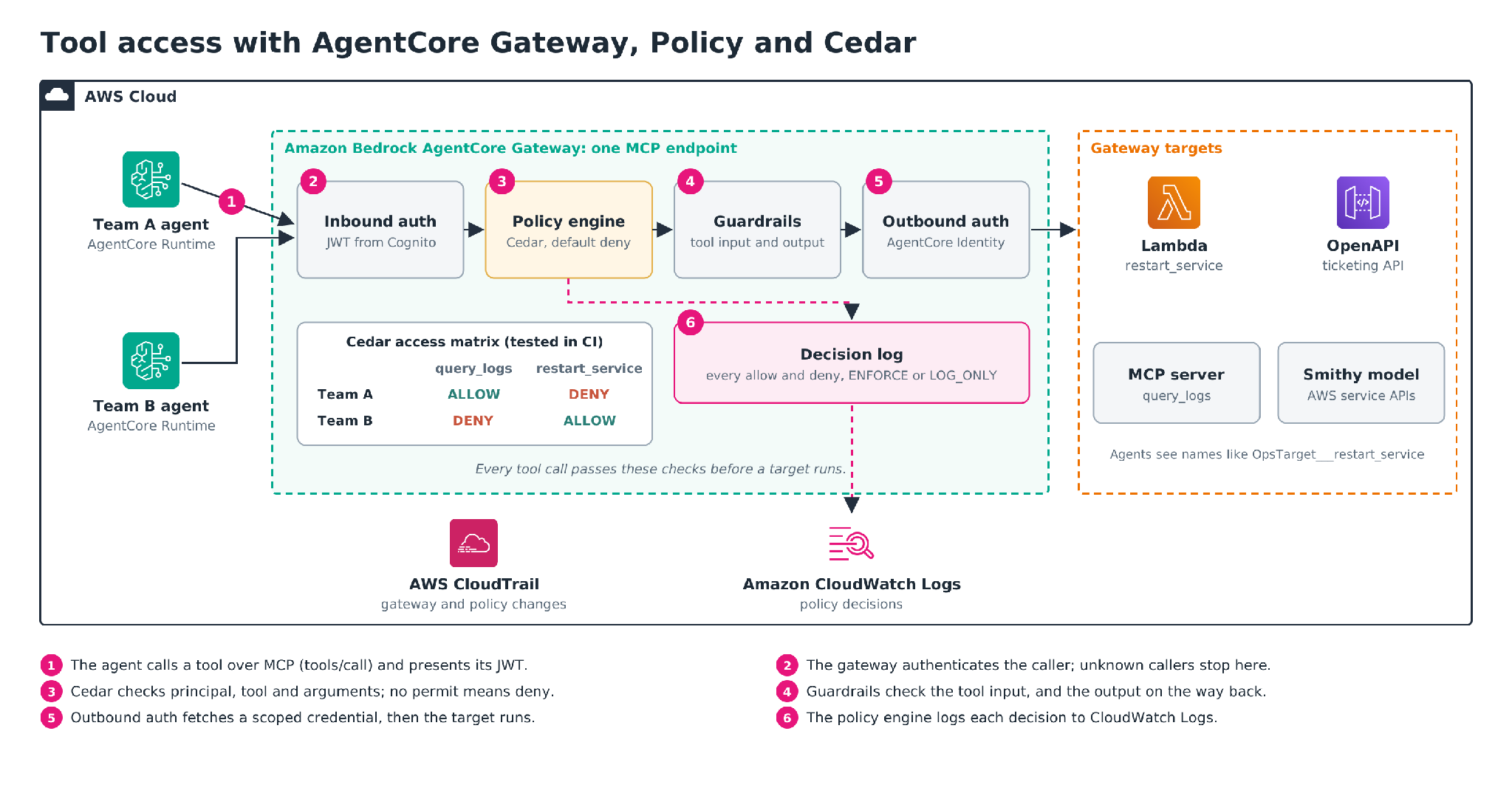
Figure 4: One tool call through AgentCore Gateway, AgentCore Policy and the gateway targets.
Tools are named by target and tool, joined by three underscores. A policy that lets agents restart services in staging, and nowhere else, can check the tool’s arguments:
permit(
  principal,
  action == AgentCore::Action::"OpsTarget___restart_service",
  resource == AgentCore::Gateway::"<gateway-arn>"
)
when {
  context.input.environment == "staging"
};
Two practical notes. First, the AgentCore CLI can generate Cedar from a plain-language prompt (agentcore gateway policy generate). Review the output before you attach it; a generated policy is still a policy you own.
Second, in ENFORCE mode, the policy engine logs every decision to CloudWatch, which gives you an audit trail of what each agent tried to do.
AgentCore Policy can also apply Bedrock Guardrails at the gateway. It checks the inputs to tool calls and the outputs that come back, looking for prompt injection and sensitive data.
Some teams restrict tools through the system prompt instead. The problem is that a model can be talked out of a system prompt instruction. A Cedar deny never reaches the model, so there is nothing to talk it out of.
Reliability and observability
Agents fail in non-deterministic ways. For example, prompt drift and cascading decisions for multi-agent systems are notoriously difficult to troubleshoot and predict. Drift could hurt reliability and also inflate spend.
Quotas reserve tokens up front. When a request arrives, Bedrock deducts input tokens plus max_tokens from your tokens-per-minute quota before the model generates anything. It adjusts the figure as output arrives and returns unused tokens at the end. Output tokens also count against quota at a multiple (high for newer models; check the model card). Set max_tokens close to what you need, and concurrency goes up.
Latency metrics need context. InvocationLatency rises for many reasons; a longer prompt or a longer answer will move it. TimeToFirstToken only applies to streaming.
Usage needs a team label. Behind a shared gateway, Bedrock metrics show a single caller. The gateway’s request log knows who sent what. A CloudWatch Logs Insights query over that log group gives you tokens per team (field names depend on your gateway’s log format):
fields @timestamp, team, model, usage.total_tokens
| stats sum(usage.total_tokens) as tokens by team, model
| sort tokens desc
Trace the agent as well as the model. AgentCore Observability emits OpenTelemetry traces to CloudWatch, using the generative AI semantic conventions. Each session shows its traces. Each trace breaks down into spans for every model call and tool call, with token use and latency on each one. Agents on AgentCore Runtime get this with no extra setup; agents running elsewhere can send the same telemetry through the AWS Distro for OpenTelemetry. The data lands in the CloudWatch GenAI Observability dashboard.
One view across agents and applications. Amazon CloudWatch Omni brings agent traces and application telemetry into one place, along with the infrastructure underneath. You create an Omni space in a central account, and it collects telemetry from your other accounts and Regions (and from other clouds such as Azure). Omni discovers services and maps their dependencies without manual setup.
For agents, it adds a session explorer and a topology view of sub-agents and tools. When something breaks, you can ask questions in plain language, and Omni runs the investigation with AWS DevOps Agent.
Metrics tell you that something changed. You still need a process for what happens next. Version everything that shapes behavior: prompts, policies, model IDs, and inference parameters. Run prompt output and tool integrations through a CI/CD pipeline. Omni covers part of this. Its Prompt Management feature versions prompt configurations and rolls them back, and experiments run one dataset against two agent variants, so you can compare quality scores and token use before you ship.
Use AgentCore Evaluations to score agent output against test sets, with AWS Step Functions running the evaluation workflows. Treat a model upgrade like a database upgrade. Test the new model against the same suite, and keep a rollback path. Omni uses AgentCore Evaluations as its evaluator engine.
Two trust metrics belong on the same dashboard as latency. Agreement rate shows how often the agent’s conclusion matches a human’s on the same input. Override rate shows how often a human reverses the agent. For incident response agents, I cover more metrics worth tracking in a separate post.
Logs, forensics and PII
Observability creates its own security problem. Bedrock model invocation logging records prompts and responses in plain text. That includes content the guardrail blocked. If someone pastes a customer’s email address into the ops chatbot, it now sits in a log group that half the platform team can read.
CloudWatch Logs data protection policies deal with this. You attach a policy to the log group (or to the whole account) that names the data identifiers to find and mask:
{
  "Name": "bedrock-invocation-logs",
  "Version": "2021-06-01",
  "Statement": [
    {
      "Sid": "audit",
      "DataIdentifier": [
        "arn:aws:dataprotection::aws:data-identifier/EmailAddress"
      ],
      "Operation": { "Audit": { "FindingsDestination": {} } }
    },
    {
      "Sid": "mask",
      "DataIdentifier": [
        "arn:aws:dataprotection::aws:data-identifier/EmailAddress"
      ],
      "Operation": { "Deidentify": { "MaskConfig": {} } }
    }
  ]
}
Both statements must list the same identifiers. The audit statement records findings; the deidentify statement masks the value.
The rest of the forensic trail follows standard AWS practice. AWS CloudTrail records API activity, including every change to a guardrail or policy. Exported invocation logs go to Amazon S3 with Object Lock, so nobody can alter them after the fact. Amazon GuardDuty watches for unusual API behavior from agent roles; AWS Config flags drift in the IAM policies and resource settings that agents depend on.
Finally, limit the blast radius. Scope credentials per agent and per tool:
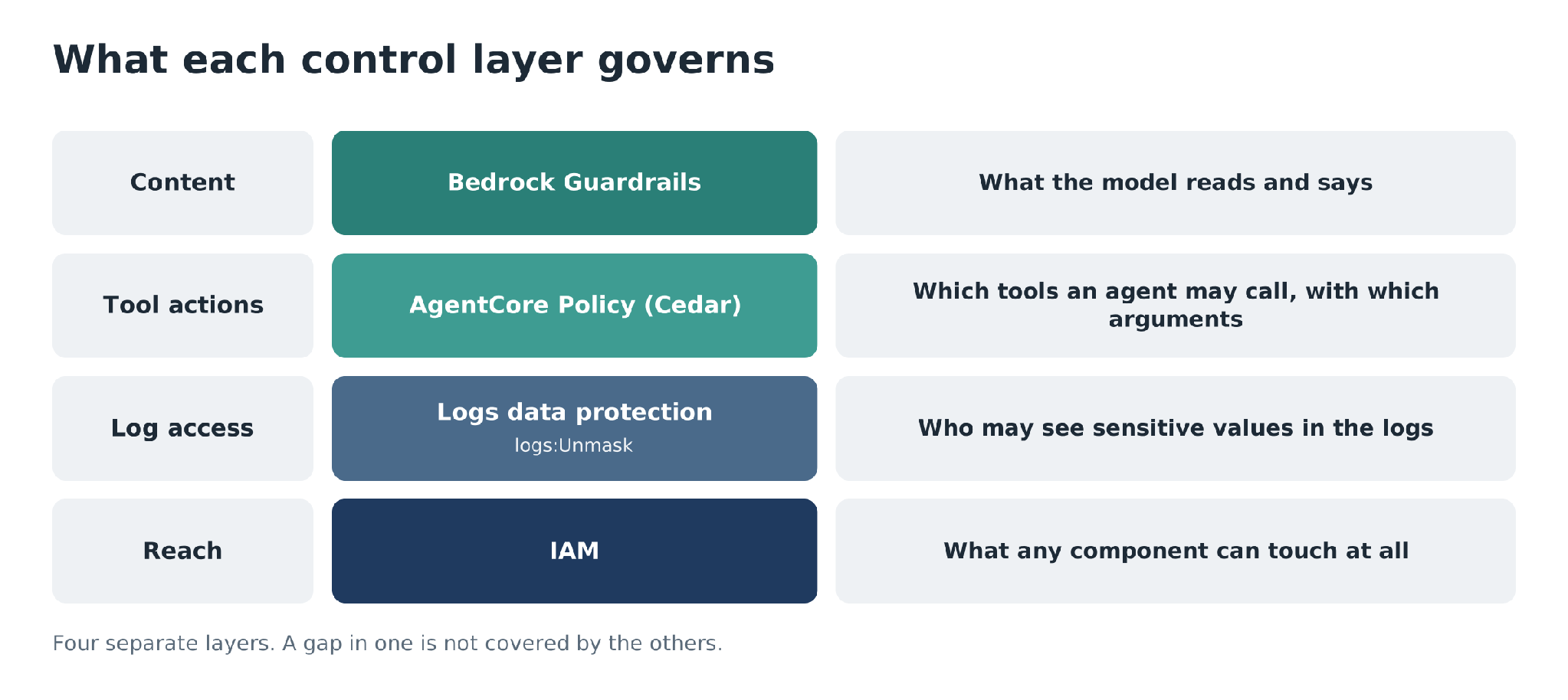
Figure 5: Four control layers and what each one governs.
Cost governance
In this era, you pay per token, and costs can grow quite fast if you are not on top of things.
Start with attribution:
Application inference profiles: create a profile per team or application, tag it, and send that team’s requests through it. The cost allocation tags then show up in Cost Explorer.
IAM principal attribution: Bedrock allocates inference costs to IAM users and roles. Tag the roles with a team or cost center, activate the tags, and filter in Cost Explorer or in CUR 2.0.
Cost Explorer grouping: split Bedrock spend by model and inference type first. You want to see where the money goes before you split it by team.
Gateway logs: the per-team token query from the previous section gives near-real-time numbers between billing updates.
Then add controls:
Prompt caching: cache the long, repeated prefix, such as the system prompt and tool definitions.
Right-sized models: send classification and extraction to a small model. Keep the large model for the reasoning steps that need it.
Anomaly detection and budgets: AWS Cost Anomaly Detection catches unexpected spikes; AWS Budgets sends alerts and enforces caps per team.
Token estimates before the call: the CountTokens API returns the token count for a request without running inference, which helps you reject oversized requests early.
Telemetry cost: agents produce a lot of telemetry, and Omni bills for ingestion and storage per GB, plus analytics (analytics up to five times the ingested volume is included).
Report cost per decision next to agreement rate. Together they give an honest return figure: what each agent decision costs, and how often it is right.
People and the adoption sequence
The technical path needs owners:
Workflow designers own the workflows that call agents. They decide what happens when an agent fails, and where a human must step in. Every workflow they own has a documented failure path: a named person or a named fallback.
Platform owners own the runtime, the gateway, the pipelines and the default controls. They pick the approved model catalog and the default guardrails. When they do the job well, a new agent reaches production without a one-off negotiation, because the platform already encodes the policy.
Domain specialists own the agents and MCP servers for their area: scope, prompts, tools, and evaluation suite. They should be able to state the agent’s success criteria and its escalation path in one sentence each.
Human-in-the-loop decision makers are the experienced operators that agents escalate to. Their escalation volume is measured, and the escalation path has a staffing plan.
A small center of excellence helps, as long as it enables teams instead of gating them. That group owns the model catalog, the MCP server registry, reference architectures and reusable guardrail and policy patterns.
An adoption sequence for inspiration (the same idea as giving platform agents autonomy in stages):
1. Start with a model-based use case. Classify support cases to surface systemic issues. The model only produces text, so it is easy to govern. You still have to build the pipelines, logging, cost attribution, and guardrails that agents will reuse later.
2. Run the first agent in shadow mode. It observes alongside the team and takes no action. Compare its findings with what the humans concluded. Move on when agreement reaches the rate you set, measured on real incidents.
3. Grant one narrow, reversible action. One action, in one workflow, behind a human approval. Now the guardrails and the audit trail do real work. You also learn your true escalation volume.
4. Widen autonomy where the evidence supports it. Remove the approval gate for the specific decisions that have a track record. Keep it everywhere else.
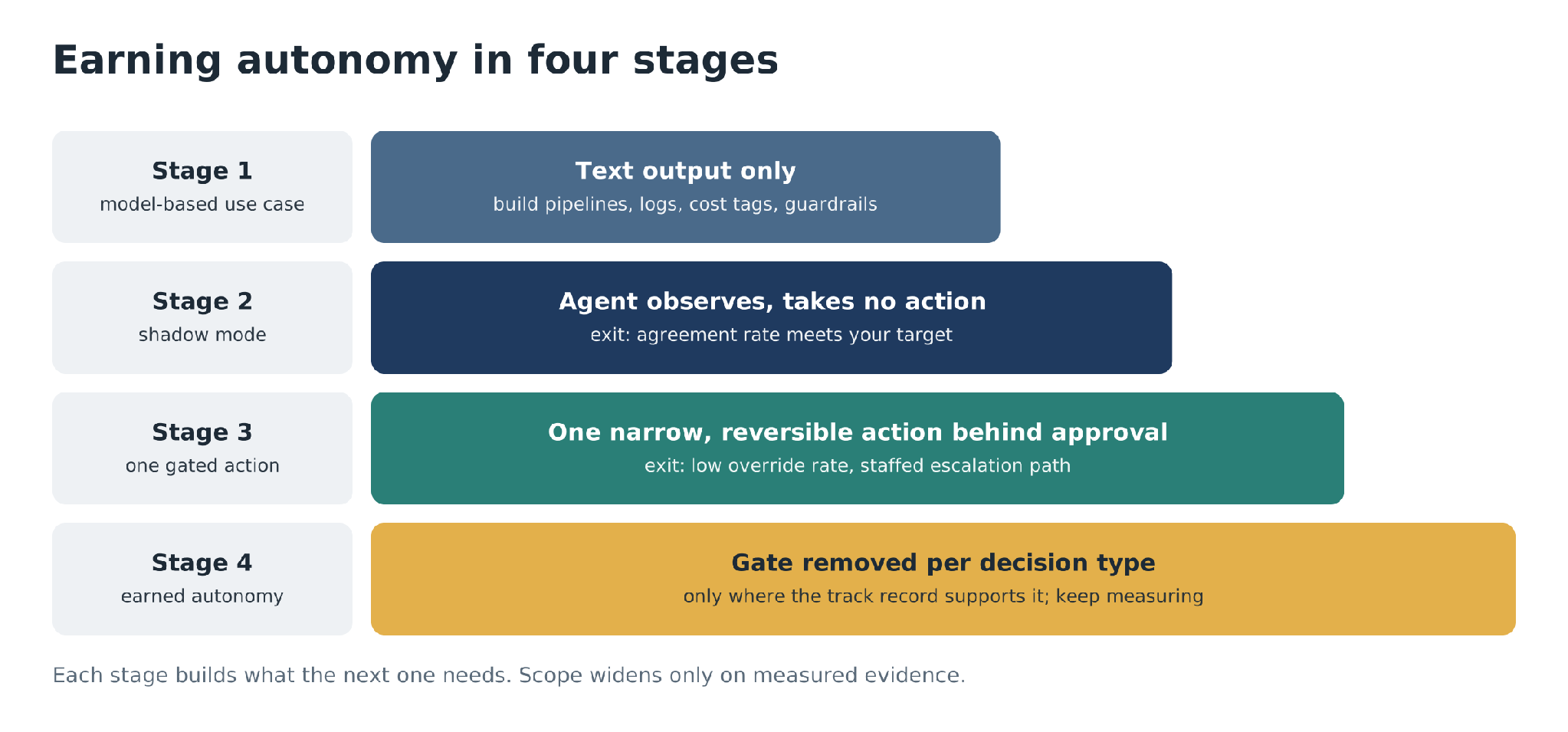
Figure 6: The four-stage adoption sequence, from a model-based use case to earned autonomy.
Before you build any of this on AgentCore, check whether a managed agent already covers the use case. AWS DevOps Agent handles incident investigation across AWS and hybrid environments. The six domains still apply to a managed service. Use them as your evaluation checklist.
Key points
Controls follow the request path. Put each control at the earliest hop that can enforce it.
Separate the layers. Bedrock Guardrails govern content. Cedar policies at AgentCore Gateway govern tool actions. Log masking governs who reads the logs, and IAM governs what any of it can reach.
Plan for quotas. Bedrock reserves input tokens plus max_tokens up front. An oversized max_tokens can throttle you while your token metrics still look fine.
Attribute cost from day one. Use application inference profiles or IAM principal tags, and check that prompt caching clears the model’s minimum.
Earn autonomy with numbers. Start with a model-based use case, move to shadow mode, and widen scope only where agreement and override rates support it.
Frequently asked questions
What is the difference between AI for operations and operations for AI?
AI for operations is agents doing operations work: triaging tickets, categorizing incidents, correlating logs and picking runbooks, as AWS DevOps Agent does. Operations for AI is the foundation that makes any agent safe to run: edge protection, identity, content guardrails, tool access, observability and cost attribution.
How do you stop an agent from calling tools it should not use?
Attach an AgentCore Policy engine to AgentCore Gateway and write Cedar policies. The gateway evaluates every tool call before the tool runs. Cedar denies by default, so a call goes through only if a permit policy matches, and any matching forbid wins. Restricting tools through the system prompt is weaker, because a model can be talked out of a prompt instruction.
Can Bedrock Guardrails protect a model that runs outside Bedrock?
Yes. The ApplyGuardrail API runs the same checks on any text you pass it. Guardrails also run in both directions: on the prompt before inference and on the response after it.
Why should production pin a numbered guardrail version?
Numbered versions are immutable, so production behavior cannot change under you. Pinning also separates duties: the team that writes guardrail policy promotes a version, the team that deploys agents consumes it, and promotion becomes the approval step.
Why does Bedrock throttle requests when token metrics look fine?
Bedrock deducts input tokens plus max_tokens from your tokens-per-minute
quota before the model generates anything, then returns unused tokens at
the end. An oversized max_tokens reserves quota you never use. Set it
close to what you need, and concurrency goes up.
How do you keep PII out of model invocation logs?
Invocation logging records prompts and responses in plain text, including
blocked content. Attach a CloudWatch Logs data protection policy to the log
group (or the account) with an audit statement and a deidentify statement
that list the same data identifiers. Viewing masked values then requires
logs:Unmask.
How do you attribute Bedrock costs to teams?
Create a tagged application inference profile per team or application and send that team’s requests through it, or tag the IAM roles that call Bedrock and activate those cost allocation tags. Both show up in Cost Explorer and CUR 2.0. Gateway logs give near-real-time per-team token numbers between billing updates.
When should an agent get more autonomy?
When the numbers support it. Start with a model-based use case, run the first agent in shadow mode until its agreement rate meets your target, then grant one narrow, reversible action behind human approval. Remove the approval gate only for the specific decisions that have a track record.